Laptop users often encounter common frustrations: a shortage of essential ports, batteries draining too quickly, or a cluttered workspace. These issues can hinder productivity and enjoyment. Fortunately, many smart laptop accessories are designed to tackle these exact problems. They transform your setup. This guide explores a range of practical gear. It will help you boost your laptop experience.
Enhancing Your Power & Charging Solutions
Staying powered up is crucial. Modern laptops demand reliable energy. The right charging gear makes a big difference.
High-Speed GaN Chargers: Power for Multiple Devices
Imagine one charger handling everything. GaN (Gallium Nitride) chargers offer this convenience. They are compact yet powerful.
The 140W GaN charger mentioned in the video is a prime example. It can charge up to four devices simultaneously. This includes laptops, phones, and tablets. Dual USB-C ports can power a 15-inch MacBook Air up to 50% in just half an hour. This is a game-changer for quick top-ups.
Even with all ports active, power adjusts intelligently. A combined output of 134W is delivered. This ensures efficient charging across devices. Furthermore, a built-in screen provides real-time charging data. It shows port status and temperature. Safety is also a priority. The system checks device temperatures millions of times daily. This helps prevent risks.
Their compact size and foldable plugs are ideal for travel. You can toss it into a bag without worry. It’s like having a mini power station on the go.
Portable Power Banks: Your On-the-Go Battery
Working away from outlets requires backup. A high-capacity power bank is your mobile power source. It keeps your routine uninterrupted.
A 25,000 mAh laptop power bank is built for this. It offers three USB-C ports. Each port delivers up to 100W. This means charging a MacBook, phone, and tablet won’t slow down. Two built-in USB-C cables are a thoughtful touch. One extends 2.3 feet. The other doubles as a sturdy carrying strap. Both are designed for durability. These integrated cables eliminate cable hunting.
You can plug in up to four devices at once. A 16-inch MacBook Pro can reach 50% in just over 30 minutes. An iPhone can hit half charge in 25 minutes. A real-time display shows battery life and charging speed. The power bank itself recharges quickly. It gets 30% charge in 20 minutes. Temperature protection also ensures safety. This device is a lifesaver when stopping isn’t an option. It acts like an extra fuel tank for your gadgets.
Advanced Connectivity & Workflow Hubs
Modern laptops are sleek but often lack ports. Docking stations and hubs provide essential connections. They simplify your workspace.
Thunderbolt 5 Docking Stations: The Ultimate Hub
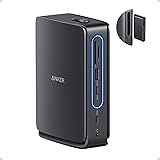
Complex workloads demand robust connectivity. A 14-in-1 Thunderbolt 5 docking station simplifies any setup. It replaces a tangle of cables and dongles.
This single hub offers extensive ports. These include USB-A, USB-C, HDMI or DisplayPort, SD cards, and Ethernet. Two Thunderbolt 5 downstream ports and one upstream port are included. They support dual 8K displays. This is perfect for designers or video editors. Large files, like 150 gigabytes, transfer in just 25 seconds. Waiting becomes a thing of the past.
It charges laptops with up to 140 watts via the upstream port. An additional 45 watts are shared across two front USB-C ports. This means phones and accessories stay powered. A quiet cooling system maintains stability. It prevents overheating during long sessions. Even small details, like soft LED lighting, improve desk aesthetics. This dock becomes a reliable part of a professional routine. It’s like expanding your laptop’s brain and nervous system.
UGREEN Revodok 105 Hub: Essential Port Expansion
Sometimes, less is more. A simpler USB hub can also be incredibly effective. The UGREEN Revodok 105 Hub fits this description.
This compact gadget provides a full set of ports. It offers a 4K HDMI output. A 100W USB-C power delivery passthrough is also included. Plus, there are three USB-A ports. One operates at USB 3 speeds (5 gigabits per second). The other two are USB 2 speeds. It essentially transforms a thin laptop into a mini-desktop. Connecting a second screen, mouse, or external drive is easy. The 100W PD port is particularly handy. It charges up to 95W while still powering the hub. Note that 4K HDMI tops out at 30Hz. This is fine for general use. Setup is plug-and-play. It works across Windows, Mac, and Android devices. This hub is a true do-it-all when laptop ports are limited.
Ergonomics & Workspace Optimization
Comfort and organization improve productivity. Ergonomic accessories prevent strain. They also create a tidy work environment.
Multi-Angle Laptop Stands: Finding Your Ideal Height
Working at an ideal screen angle is vital for comfort. A multi-angle laptop stand makes this possible. The Huanuo Magno ModuleMaster is one such stand.
It offers five adjustable heights. This allows for personalized ergonomic setups. Built-in neodymium magnets let you snap a phone or tablet to it. This provides a secondary display. The stand features a tough metal frame. It grips laptops up to 17 inches stably. A detachable cushion pad lets it convert to a lap desk. This is perfect for couch work. Its slim, minimalist design comes in several colors. While magnets only hold light devices, the stand provides great flexibility. Just pick your angle, and it stays firm. It’s like tailoring your workspace to your posture.
Rotating Laptop Stands: Share Your View Effortlessly
Some stands offer a unique twist. The LOXP adjustable stand rotates 360 degrees. You can crank your laptop around without moving the entire stand.
This stand features a sturdy, fiber-reinforced metal build. It also folds flat for travel. Laptops clamp onto its top shelf. The entire assembly then spins freely. This is useful for quickly showing a friend your screen. It also facilitates in-person sharing. The stand raises the laptop 8 to 10 inches high. This puts the screen at a more ergonomic level. Silicone pads ensure the laptop stays put. Setup is simple and tool-free. It fits 10 to 17-inch laptops. It’s lightweight but feels robust. This stand won’t wobble on your desk. For frequent screen sharing, it’s very convenient.
Vertical Laptop Stands: Reclaim Your Desk Space
Desk space is often precious. A vertical stand helps maximize it. The OMOTON vertical stand parks your laptop upright. This frees up significant horizontal space.
It’s an aluminum cradle. You can expand it to fit notebooks up to 17.3 inches. Slip your closed laptop into the slot. It then stands on its edge. This creates room for other gear. The build is solid, CNC machined aluminum. It is coated to prevent scratches. A wide base and silicone pads keep it stable. Vertical stands are excellent for docked setups. They are perfect for minimalists. They transform a cluttered desk into an organized one.
Portable Displays & Multi-Screen Setups
Expanding your screen real estate boosts productivity. Portable monitors and innovative stands make multi-screen setups easy. They are great for work and play.
Portable Monitors: Your Second Screen On the Go
A portable monitor transforms any laptop setup. It creates a dual-screen rig. The VEOUT 16-inch monitor is a great travel display.
It features a 16:10 IPS panel. The resolution is 1920 by 1200. This is slightly taller than 1080p. Color quality is excellent, with full sRGB and 100% coverage. It even supports FreeSync and HDR. Consoles like PS5 or Xbox can use it tear-free. A flip-out kickstand allows 0 to 75 degrees of tilt. It can even flip into portrait mode. Port-wise, it has two USB-C ports and one mini HDMI input. This ensures straightforward laptop connection. It also has built-in speakers. Weighing about 1.6 pounds, it’s light enough for a backpack. Excellent portability and picture quality make it a strong choice. It’s like carrying a second window into your work.
Clamp-On Monitor Arms: Tablets as Auxiliary Screens
Do you own a small monitor or tablet? You can literally put it on your laptop. The VIVO PM018 stand is a nifty gadget.
This clamp-on arm attaches to your laptop or desk edge. It provides a mount point for a portable display. You can clamp it above, left, or right of your laptop screen. It offers three different positions. It supports up to 2.2 pounds. This is enough for a 15.6-inch portable monitor. The metal arm folds flat for easy storage. You can prop a tablet for chat windows or monitor stats. It’s made of steel with a plastic knob. It is surprisingly sturdy. While it requires a flat clamping surface, it expands your display on the go. It’s a low-profile way to multiply your screen space.
Dual Monitor & Laptop Mounts: The Organized Battle Station
For a dedicated dual-display setup, a specialized mount is powerful. The Huanuo CN2 is a single-arm desk mount. It holds one monitor and one laptop tray simultaneously.
This arm clamps to your desk. It supports a 13-inch to 32-inch monitor. It also supports a ventilated laptop holder for up to a 17-inch laptop. Both devices are elevated off the desk. You can swivel, tilt, and adjust their height. This aligns both screens ergonomically. Cable management is built into the mount. Cords stay tidy. Installation options include clamp or grommet. This rig maximizes desk real estate. Your laptop doesn’t sit on the surface. While not cheap, it’s fantastic for an organized dual display battle station. It transforms your desk into a command center.
Storage, Protection & Input Devices
Protecting your gear and optimizing input methods are essential. These accessories offer security, organization, and improved interaction.
Adhesive SSD Pouches: Hidden Storage & Cable Management
Wouldn’t it be great to stick your external SSD to your laptop? The Slipdrive does exactly that. It’s a thin adhesive pouch.
It mounts on the back of your laptop. You can slide an external drive into it. The 3M adhesive is strong and repositionable. It leaves no residue. An elastic strap inside secures the drive. This is neat for cable management. No dangling drive means less clutter. On the desk, it hides a spare SSD for extra storage. It frees up your cables. It’s only for one drive. Heavy HDDs might cause it to peel off. Also, the drive is exposed, so be careful in crowded spaces. As a quick kit attachment, it’s clever. It’s like a secret compartment for your data.
Laptop Bags with Advanced Protection: Travel with Confidence
Hauling your laptop requires protection. The tomtoc Defender A42 is a well-padded shoulder bag. It fits up to 15.6-inch or 16-inch laptops.
It is made of tough nylon. It features “CornerArmor”—extra pads at the corners. Internal cushioning absorbs shocks. Reviewers compare it to a mini briefcase. Multiple pockets and sections organize accessories. An internal strap secures keys or an AirTag. The shoulder strap is thick. It has a non-slip pad. It can be detached for dual handle use. The design is slim. It offers more protection than a sleeve. For working on the move, it’s very handy. Water-resistant fabric is a plus for bad weather. It’s reliable for travel. It keeps your laptop snug. This bag is like a bodyguard for your tech.
Wireless Numeric Keypads: Spreadsheet Warrior’s Best Friend
Spreadsheet warriors rejoice! The Nulea wireless number pad is a compact 34-key numeric keypad. It works over Bluetooth or a tiny 2.4 GHz dongle.
You can pair it via Bluetooth 5.0. Alternatively, plug in the included receiver for a stable link. It remembers two devices. You can quickly switch between a gaming PC and a tablet. The build is slim and light. You can toss it in a bag easily. Inside is a rechargeable 280 mAh battery. It boasts up to 96 days of standby. It wakes up immediately on any keypress. Keys have a slight 7.5-degree tilt. Quiet scissor switches offer good tactile feedback. Performance is plug-and-play. It works with Windows, MacOS, Android, and iPad. If your laptop lacks a numpad, this is a handy portable helper. It’s like adding a dedicated calculator to your fingertips.
Travel Mice: Compact & Multi-Device Control
A good mouse is essential, even on the go. Dell’s MS700 is a neat little travel mouse. It’s incredibly small and light, just 2.01 ounces.
It twists to turn on and off. It supports DPI from 1000 up to 4000. This is switchable on the fly. Multi-device support is a cool feature. You can connect it to up to three machines. Switch between them with a twist ring. It comes with two AAA batteries. Dell claims up to two years of life. The touch-sensitive scroll is responsive. It has the usual two buttons. In use, it’s very smooth. No USB dongle is needed. It’s plug-and-play via OS Bluetooth. It’s comfy to hold for a small mouse. It pairs quickly. This mouse is like a nimble chameleon for your cursor.
Essential Maintenance & Clever Niche Tools
Even small accessories can make a big difference. These tools help maintain your laptop. They also solve unique, often overlooked problems.
Cleaning Tools: Keep Your Laptop Pristine
Dust and crumbs accumulate, even on a tidy desk. The OXO Sweep and Swipe is a simple two-in-one tool. It tackles these everyday nuisances.
One end features a retractable nylon brush. Pull it out to sweep away keyboard debris or dust. The other end has a special microfiber pad. It’s shaped to reach into screen corners. It swipes off smudges and oils. When keys feel sticky or the screen shows fingerprints, a quick run refreshes everything. It’s small and pen-like. It takes up no space. A cap provides safety. The handle feels like solid plastic. It’s not high-tech, but it’s very practical. It keeps monitors and keyboards looking new with minimal fuss. It’s like a tiny janitor for your device.
USB LED Lamps: Illuminate Your Workspace
Working in dim light needs extra illumination. The Mudder USB LED Lamps are a pair of flexible gooseneck lights. They plug into a USB port.
Each lamp has 10 mini LEDs. You can bend the aluminum neck anyway you like. Shine it directly on keys or a book. They have a touch-sensitive base. Tap to cycle through brightness levels: off, low, medium, high. Brightness is good for their compact size. They weigh almost nothing. They stick up firmly. They can also be nudged away. They draw power from USB. There is no battery fuss. They are handy for gaming or working in a dim room. Just plug one into your keyboard’s USB port. Light pops on instantly. It’s an inexpensive way to see your keyboard better at night.
Magnetic Cooling Feet: Minimalist Airflow & Tilt
Think of this as two little magnetic feet for your laptop. The Hagibis cooling pad is a pair of wedge-shaped aluminum stands. They stick under the rear corners of your laptop.
They tilt the laptop upward by about 8 degrees. This lifts the base for more airflow. It also creates a cooler typing angle. Magnets make them very easy to connect. When placed back-to-back, they snap together compactly. This allows for pocket storage. Despite their size, they’re quite strong. Each foot weighs around 1.7 ounces. Carrying a pair is almost unnoticeable. Silicone pads on top prevent scratches. Pads on the bottom stop slipping. It’s a very minimalist solution. There are no fans, no noise, just a small, effective tilt. It’s like giving your laptop tiny stilts for better breathing.
Trackpad Jigglers: Keeping Your System Awake
Finally, a bit of a novelty. The laptop Trackpad Jiggler is a cordless mouse mover. You place it where the trackpad senses motion. It simulates small touches. This keeps your system from going idle.
People use these to stay logged in during calls. They also prevent screens from locking. It’s mechanical, with a small rotating disc. For working gamers, it helps them look online all day. It prevents being flagged as AFK. It’s discreet. It doesn’t need drivers. You drop it on the trackpad. Flip a switch. The cursor makes micro-movements. This keeps your PC awake. It won’t interfere with active gaming. But as a side tool for productivity or work-from-home, it’s surprisingly handy. Not everyone will need it. For certain users, it’s a lifesaver. It’s like a tiny, undetectable assistant ensuring your laptop stays alert.
These cool laptop accessories address common user pain points. They enhance your productivity and convenience. From power solutions to ergonomic setups, the right gear can truly elevate your experience. Exploring these clever tools will undoubtedly optimize your daily workflow.
Beyond the Cool: Your Laptop Accessory Questions Answered
Why should I consider using laptop accessories?
Laptop accessories help solve common frustrations like limited ports, quickly draining batteries, or a cluttered workspace, making your overall laptop experience much better.
What is a GaN charger and why is it useful?
A GaN (Gallium Nitride) charger is a compact, powerful charger that can quickly charge multiple devices like your laptop, phone, and tablet all at once.
Why would I need a docking station or a USB hub?
Modern laptops often have limited ports, so a docking station or USB hub adds essential connections for things like external monitors, extra USB devices, and wired internet, simplifying your workspace.
How can a laptop stand improve my work setup?
A laptop stand elevates your screen to a more ergonomic height, which can help reduce neck and back strain, improve your posture, and free up valuable desk space.